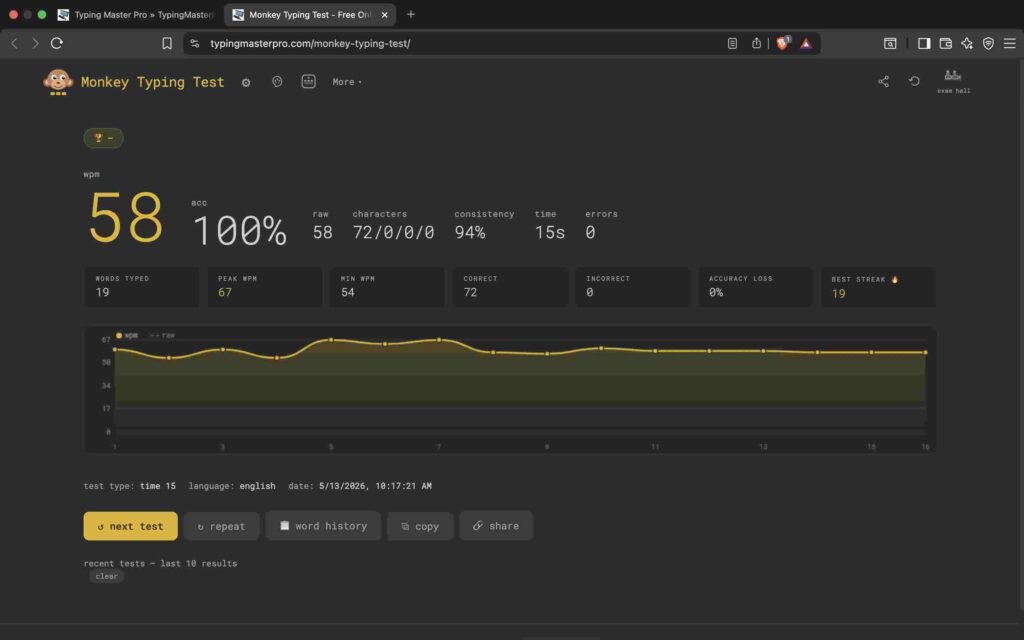
If you want a fast, distraction-free way to test and improve your typing speed, the Monkey Typing Test is one of the best tools available online. It is completely free, works in any browser, and requires no account or download. Whether you are a student preparing for a government exam, a professional who types all day, or simply someone curious about their words per minute, this tool gives you accurate results in real time. This guide covers everything you need to know about the Monkey Typing Test, how it works, what your results mean, and how to use it to genuinely improve your typing.
Note: Click on Link 1 to learn more about iframes, so you can understand how this typing tool currently works. A live page will open where you can try out this typing tool.
Link 1 – (https://typingmasterpro.com/monkey-typing-test/) click here and start typing.
Link 2 – (https://typingmasterpro.com/) Homepage
The Monkey Typing Test is a browser-based typing speed test that measures your WPM (words per minute), accuracy, raw WPM, and consistency in real time. It is built into TypingMasterPro.com as a dedicated typing tool, designed to be clean, fast, and effective without any unnecessary clutter.
The name comes from Monkeytype, one of the most popular open-source typing test platforms globally. This version is hosted directly on TypingMasterPro so you can access it alongside all the other typing tools on this site without jumping between multiple websites.
Key features of the Monkey Typing Test include:
Getting your first result takes less than two minutes. Here is exactly how to run a test:
The test area scrolls automatically as you type, keeping the current line always visible. A blinking caret shows your position. If you make a mistake and want to correct it, use Backspace. If you prefer to practise without the safety net of corrections, switch on Confidence Mode in the settings to disable Backspace entirely.
After each test you will see four numbers. Most people only pay attention to WPM. Here is what each metric actually means and why they all matter:
This is your net typing speed. It counts only the words you typed correctly. The standard calculation treats every five characters (including spaces) as one word. So even if you type a long word like ‘professional’ correctly, it counts as more than one word in the calculation. WPM is the number most people refer to when they talk about typing speed.
Your accuracy percentage shows what proportion of your keystrokes were correct. Anything below 95% is worth addressing because real-world typing errors cost more than just speed. Fixing a mistake in a document or email requires extra keystrokes, re-reading, and mental refocusing, all of which add up over a full working day.
Raw WPM counts every word you typed including incorrect ones, before any accuracy penalty is applied. The gap between your WPM and Raw WPM tells you exactly how much your errors are costing you. A large gap means improving accuracy would raise your net WPM significantly even without typing any faster.
Consistency measures how steady your pace is from the start of the test to the end. A score above 85% means your typing is even and controlled. A low score means you are typing in bursts, fast on short common words and slow on longer or unfamiliar ones. Improving consistency is one of the most direct ways to raise your WPM, because it means your fingers are building reliable, even muscle memory.
How you compare depends on your goal. Here is a practical breakdown of WPM ranges and what they mean in real-world terms:
| WPM Range | Level | Real-World Context | What to Focus On |
| Below 30 WPM | Beginner | Hunt-and-peck typist | Learn home row position first |
| 30 to 50 WPM | Average | Casual computer user | Daily 15-minute practice sessions |
| 50 to 70 WPM | Above Average | Office professional | Prioritise accuracy over speed |
| 70 to 90 WPM | Fast | Journalist, developer | Add punctuation and number practice |
| 90 to 120 WPM | Very Fast | Professional typist | Work on consistency score |
| 120+ WPM | Elite | Transcriptionist, power coder | Maintain and avoid burnout |
For competitive exams in India, the benchmarks are more specific. SSC CHSL and SSC CGL typing tests require a minimum of 35 WPM in English. CPCT requires 30 WPM with at least 85% accuracy. Bank clerk posts often require 40 WPM. These are minimums. Aiming for 50 to 60 WPM gives you a comfortable buffer and significantly reduces exam day stress.
The Monkey Typing Test includes several modes that make it useful for different types of practice:
The default mode. You type for a set duration (15, 30, 60, or 120 seconds) and your results appear when time runs out. This is the best mode for measuring and tracking your speed over time because you always have a consistent test duration to compare against.
Instead of a timer, you type a fixed number of words (10, 25, 50, or 100). The test ends when you finish all the words. Word mode is good for focused practice sessions where you want to track accuracy on a specific word count rather than racing a clock.
You type a real quote pulled from literature, famous speeches, or popular culture. Quotes contain punctuation, mixed sentence lengths, and varied vocabulary, making this mode the most realistic preparation for real-world typing tasks. It is particularly useful for anyone preparing for typing tests that use passage text.
You paste in your own text and type that. This is ideal for exam preparation when you have a specific passage you need to practise, or for warming up with text that is relevant to your actual work.
These toggles add commas, full stops, apostrophes, and digits to the word list. Many typists who score well on plain-text tests see their speed drop noticeably the first time they turn on punctuation. This is because they have never practised reaching for punctuation keys consistently. Turning these modes on is essential for anyone preparing for a real typing exam.
The Monkey Typing Test offers more than 200 visual themes. These range from minimal light and dark themes to high-contrast, retro, and colourful designs. You can change the theme at any time without affecting your test results. Themes are saved in your browser so your preference is remembered when you return.
Language support covers more than 100 languages. To switch language, open the settings and select from the language dropdown. The word list updates immediately. This makes the tool useful for non-English typists and for anyone who wants to practise typing in a second language.
For Hindi typists, the tool supports Devanagari script. If you need a dedicated Hindi typing practice tool, see the Hindi Typing Test and Hindi Type Pro pages also available on TypingMasterPro.
If you are preparing for SSC, CPCT, RRB NTPC, Bank Clerk, or any other exam that includes a typing component, this tool can be a significant part of your daily practice routine. Here is how to use it effectively:
Start every session with a 60-second test in plain word mode to warm up your fingers. Then switch to Quote Mode with Punctuation enabled and run 3 to 4 tests of 2 minutes each. This matches the format of most government typing exams more closely than plain word lists.
Track your accuracy on every test. For CPCT, you need at least 85% accuracy. For SSC, the standard is net speed with errors penalised. Getting used to clean, accurate typing during practice means you will not need to consciously slow down on exam day.
Aim to reach your target WPM comfortably in practice before the exam. If the requirement is 35 WPM, practise until you are consistently hitting 50 WPM. The extra pressure of an exam environment, unfamiliar equipment, and nerves will naturally reduce your speed by 10 to 15 percent.
There are several popular free typing tools available. Here is how the Monkey Typing Test compares to the main alternatives:
| Feature | Monkey Typing Test | 10FastFingers | TypingClub | Typeracer |
| Completely Free | Yes | Yes | Partial | Partial |
| No Login Required | Yes | Yes | No | Yes |
| 200+ Themes | Yes | No | No | No |
| 100+ Languages | Yes | Yes | No | No |
| Consistency Score | Yes | No | No | No |
| Quote Mode | Yes | No | No | Yes |
| Punctuation Mode | Yes | Limited | Yes | Yes |
| Custom Text | Yes | No | No | No |
| Dark Mode | Yes | No | Yes | No |
Yes. The Monkey Typing Test on TypingMasterPro is 100% free with no hidden features behind a paywall and no account required to use it.
Yes. The tool is fully responsive and works on smartphones and tablets. A physical keyboard will give you more accurate results than a touchscreen keyboard, but the tool functions on both.
Net WPM is calculated as the number of correctly typed characters divided by five, then divided by the number of minutes elapsed. Five characters is the standard definition of one word, including spaces.
Yes. Your results and settings are saved in your browser’s local storage. Nothing is sent to any external server. Your typing history stays on your own device.
WPM is your net speed after errors are subtracted. Raw WPM includes all words typed regardless of mistakes. The difference between the two shows exactly how much your errors are costing you in speed.
Yes. Use Quote Mode with Punctuation enabled for practice that closely matches the format of real government typing exams. Aim to consistently exceed the required WPM in practice before your exam date.
Most typists practice on plain word lists and develop good speed there, but have not built the same muscle memory for punctuation keys. The drop is normal. Regular practice with punctuation mode turned on will bring your speed back up within a few weeks.
The Monkey Typing Test is one of the most complete free typing tools you will find online. Between the 200 themes, 100 languages, multiple test modes, real-time performance tracking, and the full consistency and accuracy metrics, it gives you everything you need to measure where you are and make consistent progress.
There is no installation, no account, and no cost. Use the tool in the iframe above to take your first test right now, then return daily for short, focused practice sessions. Consistent daily practice is the only thing that actually builds lasting typing speed. If you want to explore more typing tools, see Fast Fingers Typing, Key Rush, TypeBlitz, and the full list of tools available on TypingMasterPro.