Fast Fingers Free Online Typing Test is one of the most widely used free online typing test platforms in the world. It is trusted by students, professionals, and competitive typists across more than 100 countries. The tool embedded on this page gives you full access to the Fast Fingers typing test directly, without leaving TypingMasterPro. You can measure your WPM, check your accuracy, switch languages, and even compare your score on the global leaderboard, all at no cost and without creating an account.
Note: Click on Link 1 to learn more about iframes, so you can understand how this typing tool currently works. A live page will open where you can try out this typing tool.
Link 1 – (https://typingmasterpro.com/fast-fingers-free-online-typing-test/) click here and start typing.
Link 2 – (https://typingmasterpro.com/) Homepage
Fast Fingers is a browser-based typing speed test that has been running from many years. It is one of the oldest and most trusted free typing platforms available online. The test works by showing you a set of the most commonly used words in your chosen language and asking you to type them within a 60-second window. Your result is calculated as WPM (words per minute) alongside an accuracy percentage.
What makes 10 Fast Fingers stand out from basic typing tests is its global community feature. After every test you can see how your score compares to the top 100 typists in the last 24 hours. The leaderboard shows real usernames, WPM scores, and how recently each score was set, which gives you a genuine sense of where you stand against other typists worldwide.
Key features of the 10 Fast Fingers typing test:
The tool is loaded in the iframe above. Here is how to run your first test:
To use the Submit button, you need a free Fast Fingers account. Submitting your score saves it to the leaderboard and lets you track your personal history. Basic testing without an account gives you your WPM and accuracy immediately without any sign-up.
The default 60-second test using the 200 most common words in your chosen language. This is the mode most people use for everyday practice and score comparison. Because the word list is consistent, your scores across different sessions are directly comparable, which makes it useful for tracking genuine progress over time.
Uses a harder word list drawn from less common vocabulary. This mode is useful for typists who have plateaued on the standard test and want a more challenging word set. It is also good preparation for real-world typing where you regularly encounter unfamiliar words rather than a controlled list of the most common ones.
You paste any text you want into the tool and type that. This is the most useful mode for exam preparation. If you have a specific passage that appears in a government typing exam or a work document you need to type accurately, paste it in and practice it directly. This removes the gap between test practice and real-world typing.
Race against other real users in a live typing competition. You are matched with other typists at a similar speed level and compete to finish the text first. Multiplayer mode adds pressure that is absent from solo practice, which is valuable because exam conditions and real-world deadlines involve exactly that kind of pressure.
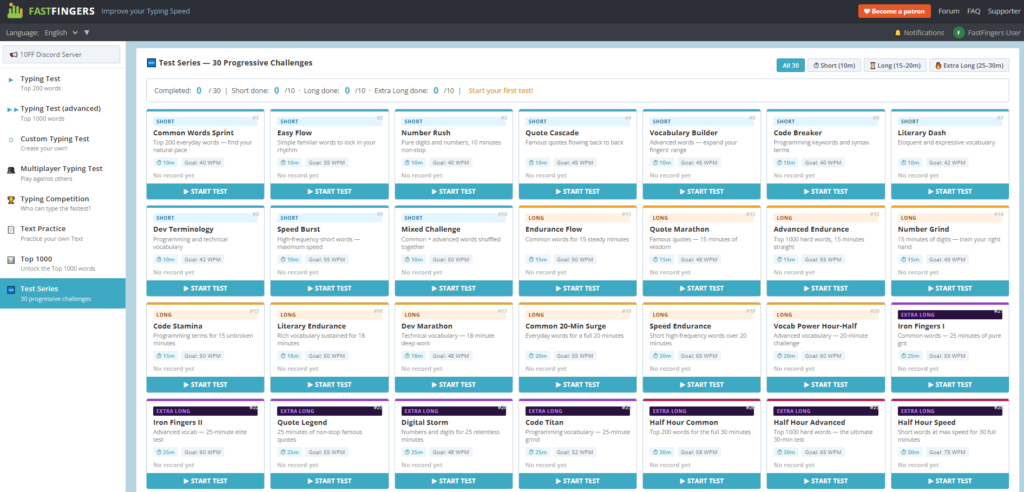
A set of progressively harder typing challenges that move through different word categories and difficulty levels. Text Series is useful for structured improvement because it gives you a clear path from beginner to advanced rather than repeating the same test indefinitely.
A practice mode focused on the 1000 most commonly used words in English. Mastering these words means you can type the majority of everyday text fluently, since the top 1000 words account for around 80 percent of all written English.
The Top Rankings section shows the highest WPM scores submitted in the last 24 hours for the current test mode. You can view the top 50 or top 100 scores and filter by the 24-hour window or all-time records.
Looking at the leaderboard gives useful context. Elite typists regularly score between 140 and 200 WPM on the standard test. The top scores you see in the leaderboard represent years of deliberate practice. For most users, a target of 60 to 80 WPM is a realistic and highly practical goal that puts you well above the average typist.
If you want your scores saved to the leaderboard and your personal progress tracked over time, you can create a free account directly on the 10fastfingers.com website. Basic testing on this page works without any account.
Here is how different WPM scores on the 10 Fast Fingers standard test translate to real-world typing ability:
| WPM Score | Level | Real-World Meaning | Priority for Improvement |
| Under 30 | Beginner | Hunt and peck typist | Home row position and touch typing basics |
| 30 to 50 | Basic | Casual everyday typist | Accuracy first, then speed |
| 50 to 70 | Intermediate | Office and admin work | Add punctuation and number practice |
| 70 to 90 | Proficient | Professional typist | Consistency and sustained speed |
| 90 to 120 | Advanced | Developer or journalist | Advanced word sets and rare characters |
| 120+ | Expert | Competitive typist | Leaderboard competition and endurance |
For government exam preparation in India: SSC CGL and CHSL require 35 WPM in English, CPCT requires 30 WPM with 85% accuracy, and bank clerk posts typically require 40 WPM. Practising on 10 Fast Fingers until you consistently score 50 to 55 WPM gives you a strong buffer for the actual exam.
One of the most useful features of 10 Fast Fingers is its broad language support. You can switch the test language using the dropdown at the top of the tool. Available languages include English, Hindi, German, French, Spanish, Portuguese, Italian, Russian, Japanese, Korean, Arabic, Turkish, and dozens more.
Switching language changes the entire word list to that language’s most commonly used words. This makes 10 Fast Fingers genuinely useful for non-English typists and for anyone learning to type in a second language.
For Hindi typing specifically, the tool supports Devanagari script when Hindi is selected. If you need a dedicated Hindi typing practice environment, also see the Online Hindi Typing and Hindi Type Pro tools available on TypingMasterPro.
Because the standard test uses the same word pool every time, your scores across sessions are directly comparable. Take the test at the start of each practice session to get a baseline, then again at the end to see same-day improvement. Log your scores weekly so you can see progress over a longer period.
The standard test uses the 200 most common words. Many of these are short function words like the, and, for, with, that, have, and this. These words appear constantly in real text. If you hesitate even slightly on them, that hesitation adds up across a full test. Identify the common words you type slowly and practise them in isolation until they feel automatic.
The advanced test is harder because the words are less familiar. Taking it once a week alongside your regular standard test practice forces your fingers to deal with unfamiliar patterns, which improves your overall adaptability and raises your standard test score indirectly.
Racing other users adds genuine time pressure that solo practice does not. If you practise exclusively in solo mode, you may find that your score drops noticeably under the pressure of a real exam. Regular multiplayer sessions build the ability to maintain speed and accuracy when you are aware of being measured.
Most typists have specific letter combinations they find difficult. Common examples include words with double letters, words ending in -tion or -ment, and words requiring a stretch to unusual keys. After each test, think about which words slowed you down and type those specific words ten times slowly and correctly.
| Feature | 10 Fast Fingers | Monkeytype | Typeracer | TypingClub |
| Completely Free | Yes | Yes | Partial | Partial |
| No Login for Basic Use | Yes | Yes | Yes | No |
| Global Leaderboard | Yes | No | Yes | No |
| Multiplayer Mode | Yes | No | Yes | No |
| 100+ Languages | Yes | Yes | No | No |
| Custom Text Input | Yes | Yes | No | No |
| Advanced Word Sets | Yes | No | No | Yes |
| Works on Mobile | Yes | Yes | Yes | Yes |
Yes. The standard typing test, advanced test, multiplayer mode, and language switching are all free. Creating an account to save scores to the leaderboard is also free. There is no paid tier required for any of the core features.
No. You can take the test and see your WPM and accuracy without creating an account. An account is only needed if you want to submit your score to the leaderboard and track your personal history over time.
Normal variation of 5 to 10 WPM between tests is completely expected. Factors include finger warmth, focus level, familiarity with the specific words shown, and time of day. Average your last five or ten scores for a more reliable picture of your actual typing speed.
Accuracy shows the percentage of words you typed correctly out of total words attempted. A word is counted as wrong if you pressed Space before correcting an error. Backspacing and correcting before pressing Space keeps the word counted as correct.
Yes. The standard 60-second test with English selected is good daily practice. For closer exam simulation, use the Custom Typing Test and paste in actual exam passages. Enable punctuation-heavy text to match the format of real government typing tests.
10 Fast Fingers counts whole correctly typed words, not characters. Each correctly typed word followed by a space counts as one word. Your WPM is the total correct words divided by the test duration in minutes (1 minute for the standard test).
The average typist scores between 40 and 60 WPM on the standard test. A score above 70 WPM puts you in the top 25 percent of users. Scores above 100 WPM are considered expert level and represent a small percentage of the user base.
Use the tool loaded above to take your first test right now. Note your WPM and accuracy, check where you sit on the leaderboard, and then return daily for short 15-minute practice sessions. The leaderboard gives you a real benchmark to work toward, which makes the improvement process more concrete and motivating than practising without any comparison point.
If you want to explore more typing tools, see the full list on TypingMasterPro including Monkey Typing Test, TypeWhiz, KeyRush, TypeBlitz, and the dedicated Hindi Typing Test for Devanagari practice.