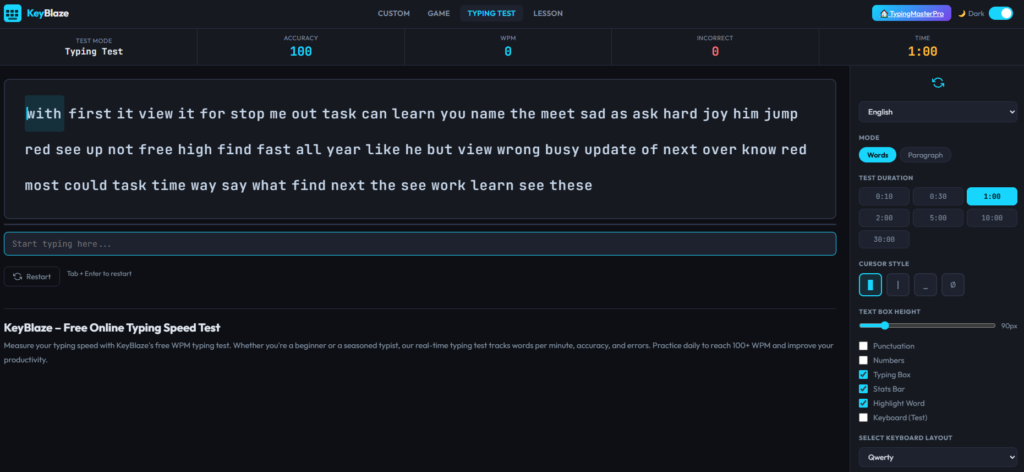
KeyBlaze is a free online typing tutor and speed test that stands apart from most tools on TypingMasterPro because it is not just a test – it is a structured learning tool. While other tools on this site measure how fast you already type, KeyBlaze is built to teach you to type correctly from the beginning, or to retrain specific habits that are limiting your speed. If you are a beginner who has never learned touch typing properly, or an intermediate typist whose bad habits are holding your WPM back, KeyBlaze is the right starting point. Available on this page through TypingMasterPro, it requires no download, no account, and no payment.
Note: Click on Link 1 to learn more about iframes, so you can understand how this typing tool currently works. A live page will open where you can try out this typing tool.
Link 1 – (https://typingmasterpro.com/keyblaze-typing-speed-test/) click here and start typing.
Link 2 – (https://typingmasterpro.com/) Homepage
KeyBlaze is a browser-based typing tutor that combines structured lessons with speed testing and real-time feedback. It was originally developed as a desktop typing software by NCH Software and has been widely used in schools, offices, and homes as a complete beginner-to-advanced typing course. The version embedded on this page gives you access to its core practice and testing features directly in your browser.
The key difference between KeyBlaze and a standard typing test is that KeyBlaze is curriculum-based. It does not just throw words at you and time how fast you type them. It walks you through the keyboard in a structured sequence, starting with the home row and gradually introducing each key zone until you have full keyboard coverage. Each lesson builds on the previous one, and the tool tracks your accuracy on each key so you know exactly where your technique needs work.
What KeyBlaze provides:
KeyBlaze loads in the iframe above and gives you two main paths: structured lessons and speed tests. Here is how to use each:
Understanding how KeyBlaze organises its lessons helps you use it more effectively and choose the right starting point for your current skill level.
The home row is the middle row of letter keys: A, S, D, F on the left and J, K, L, semicolon on the right. This is the foundation of touch typing. Every other key on the keyboard is reached by moving a finger away from its home row resting position and then returning. KeyBlaze begins here because a typist who cannot confidently type the home row keys without looking will not build reliable speed on any other part of the keyboard.
Home row lessons focus on building the muscle memory for each key’s position relative to your resting finger placement. The exercises repeat each key extensively, then introduce combinations, then short words made entirely from home row letters. By the end of these lessons your fingers should be able to find every home row key without a moment’s hesitation.
The top row of letter keys – Q, W, E, R, T, Y, U, I, O, P – contains many of the most commonly used letters in English, including E, T, and R. Once your home row is solid, KeyBlaze introduces these keys one or two at a time, always showing you the correct finger assignment and reinforcing the return to home row position after each keystroke.
The bottom row – Z, X, C, V, B, N, M – requires a downward reach from the home row. These keys are less frequently used in average English text than the top row keys, but they include several important letters. Bottom row lessons are typically the most challenging for new typists because the downward reach feels less natural than the upward reach to the top row.
KeyBlaze includes lessons for the number row and common punctuation symbols. These lessons are particularly valuable for anyone preparing for government typing exams or data entry work, where numbers and punctuation appear regularly. Many typists who are reasonably fast on letter keys slow dramatically when they encounter numbers or symbols. Dedicated number and symbol lessons address this directly.
Beyond the key-introduction lessons, KeyBlaze includes exercises focused on common word patterns, two-letter combinations (bigrams), and extended passages. These exercises are designed for typists who have learned all the keys but want to build fluency – the ability to type complete words and sentences smoothly rather than letter by letter.
If you currently type using two fingers, hunt-and-peck style, or any method that involves looking at the keyboard to find keys, KeyBlaze is the right first tool. The structured lesson sequence takes you from zero keyboard knowledge to full touch typing coverage in a systematic way that random practice on speed tests cannot match. Starting with KeyBlaze and completing the lesson sequence before moving to speed tests is the fastest route to genuine touch typing ability.
Many people type every day for years without ever learning the correct finger assignments. They develop personal systems that feel natural but are fundamentally limited. Common bad habits include using the wrong finger for certain keys, never using the little finger on either hand, or always typing with the same hand leading. KeyBlaze’s lesson structure and per-key feedback make it easy to identify and correct these habits systematically.
For SSC, CPCT, RRB, and bank exam candidates who have not yet reached the required WPM, KeyBlaze provides the structured foundation that speed tests alone cannot. If your accuracy is below 90%, the root cause is almost always incorrect finger placement for specific keys. Working through KeyBlaze lessons for two to three weeks before returning to speed tests typically produces a noticeable improvement in both accuracy and WPM.
KeyBlaze’s structured lesson format makes it easy to assign specific lessons to students or children and track their progression. The clear lesson sequence, the finger placement diagrams, and the per-key feedback make it a practical tool for anyone who needs to teach typing in a systematic way rather than simply telling someone to practice.
| Aspect | KeyBlaze (Tutor) | Speed Tests (Monkey Typing, TypeBlitz, etc.) |
| Primary purpose | Teach correct technique and key placement | Measure typing speed and accuracy |
| Best for | Beginners and retraining bad habits | Tracking WPM improvement over time |
| Session structure | Guided lessons with specific objectives | Open-ended timed tests |
| Feedback type | Per-key accuracy and finger guidance | Overall WPM and accuracy score |
| Progression | Structured curriculum with defined stages | Self-directed, no forced sequence |
| Time per session | 15 to 30 min per lesson | 2 to 5 min per test |
| When to use | Early learning phase and habit correction | Daily benchmark and practice |
The most effective approach combines both. Use KeyBlaze for technique and foundation work in the early stages or when you need to correct a specific habit. Use speed tests on Monkey Typing, TypeBlitz, or 10 Fast Fingers for daily WPM benchmarking once your technique is established.
Spend every session on home row lessons until you can type all eight home row keys without looking, with 98% accuracy or above. Do not move to the next zone until home row feels completely automatic. This foundation determines the speed of everything that follows.
Begin top row lessons while continuing to warm up on home row exercises at the start of each session. Focus on one or two new keys per day. The goal by the end of week two is to type the full top and home row without looking, with accuracy above 95%.
Introduce bottom row keys using the same gradual approach. By the end of week three you should have full alphabet coverage. Take a speed test at the end of each session to track how your WPM is responding to the new key coverage. Expect your speed to be lower than before you started because you are now using correct technique rather than your previous habits. This is normal and temporary.
Work through number and symbol lessons and then switch focus to fluency exercises – passages and word pattern drills that build smooth, connected typing rather than key-by-key searching. By the end of week four, take a 60-second test on 10 Fast Fingers or Monkey Typing to record your new baseline WPM with correct technique. For most users who follow this plan consistently, the improvement from week one to week four is significant and continues to compound with further practice.
| Phase | Primary Tool | Supporting Tools | Goal |
| Complete beginner | KeyBlaze lessons | None yet | Learn home row, correct finger placement |
| Building coverage | KeyBlaze lessons | TypeBlitz for daily benchmark | Full alphabet, numbers, symbols |
| Developing speed | Speed tests (TypeBlitz, TypeWhiz) | Key Rush for weak keys | 50+ WPM with 95%+ accuracy |
| Competitive level | 10FF, Monkey Typing, Key Racer | Key Rush, KeyBlaze for tune-up | 70+ WPM, leaderboard practice |
| Exam preparation | Key Racer, 10 Fast Fingers | KeyBlaze for accuracy tune-up | Consistent 50+ WPM under pressure |
Yes. KeyBlaze on TypingMasterPro is completely free with no account required and no features locked behind a paid subscription.
KeyBlaze is most valuable for complete beginners and for intermediate typists who have developed bad habits. Experienced typists who already use correct touch typing technique will get more from speed tests and adaptive tools like Key Rush than from KeyBlaze’s structured lessons.
At 15 to 20 minutes per session every day, most users work through the core lesson sequence in three to four weeks. The number of sessions required depends on your starting level and how much time you spend on each lesson before moving to the next.
If you currently type using hunt-and-peck or with the wrong fingers, start with KeyBlaze. If you already use touch typing with reasonably correct technique and your goal is to increase speed, start with a speed test tool like Monkey Typing or TypeBlitz and use Key Rush to address specific weak keys.
Yes. KeyBlaze is well suited for school-age children learning to type. The structured lesson format, finger placement diagrams, and gradual key introduction make it accessible for young learners. Parents and teachers can assign specific lessons and track progress through the lesson sequence.
Yes, and it is a sign that the lessons are working. When you switch from your previous typing habits to correct touch typing technique, your speed drops temporarily because you are using unfamiliar finger movements. This is exactly the same experience musicians have when they correct their hand position or athletes have when they rebuild their technique. The short-term drop is followed by a higher speed ceiling than your previous habits allowed.
KeyBlaze is a structured typing tutor that teaches correct technique through guided lessons. Key Rush is an adaptive speed tool that identifies your existing weak keys and generates targeted practice text around them. Use KeyBlaze to learn or correct your technique. Use Key Rush once your technique is established to identify and fix the specific keys limiting your speed.
Use the KeyBlaze tool in the iframe above to begin your first lesson. If you are new to touch typing, start with the home row lesson and do not move on until it feels automatic. If you are retraining a bad habit, identify which keys you type incorrectly and start at the lesson that covers those keys. Return daily for 15 to 20 minutes and follow the lesson sequence consistently.
Once you have completed the KeyBlaze lesson sequence and established correct touch typing technique, the other tools on TypingMasterPro will help you build speed on that foundation. Use TypeBlitz or TypeWhiz for daily speed benchmarks, Key Rush for targeted weak-key improvement, Key Racer for pressure-based practice, and 10 Fast Fingers or Monkey Typing Test for leaderboard comparison. All tools are free and available without login.