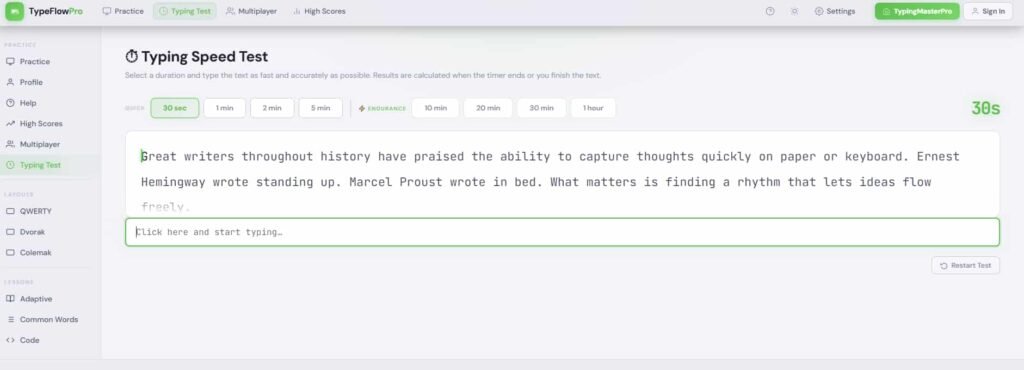
Type Flow Pro is a free online typing practice tool built around a concept that separates good typists from great ones: flow. Most typing tools measure how fast you type on average. Type Flow Pro focuses on how smoothly and consistently you type from the first word to the last, training you to maintain an even, uninterrupted rhythm throughout an entire session rather than sprinting through easy words and stalling on hard ones. Available directly on TypingMasterPro through the tool above, it requires no account, no download, and no cost to use.
Note: Click on Link 1 to learn more about iframes, so you can understand how this typing tool currently works. A live page will open where you can try out this typing tool.
Link 1 – (https://typingmasterpro.com/type-flow-pro-typing/) click here and start typing.
Link 2 – (https://typingmasterpro.com/) Homepage
Type Flow Pro is a browser-based typing practice platform that emphasises smooth, consistent typing rhythm over raw burst speed. It is designed for typists who already have a reasonable WPM score but find that their speed is uneven – fast on short common words, noticeably slower on longer or less familiar ones, with hesitations that break their rhythm and reduce their average.
The tool measures not just your overall WPM and accuracy but the consistency of your speed across the full session. A typist who maintains 55 WPM from start to finish scores better on consistency than one who averages 65 WPM but with frequent surges and drops. Consistency is the metric that tells you whether your typing skill is genuinely developed or whether it is a collection of partial habits with gaps in between.
What Type Flow Pro offers:
Type Flow Pro is straightforward to begin using. Here is how to get started:
The most important mindset shift for Type Flow Pro compared to other typing tools: your target is a comfortable, maintainable pace, not your maximum possible speed. If you find yourself surging on short words and dropping on long ones, you are not in flow. Slow down to the pace at which you can stay consistently smooth and build speed from there.
Typing flow is the state in which your fingers move through text at a steady, automatic pace without conscious effort on individual keys. It is the typing equivalent of what musicians call playing in the pocket or what athletes call being in the zone. When a typist is in flow, their WPM is consistent, their error rate is low, and typing feels effortless rather than effortful.
Flow is not just a pleasant experience – it is the most productive state for real-world typing work. A writer, developer, or data entry professional who types in flow produces significantly more output per hour than one who types in bursts with frequent pauses, corrections, and mental recalibrations. The difference is not always visible in a 60-second WPM test, which averages out the peaks and troughs. It is very visible in a full day of typing work.
Understanding what breaks flow is the first step to maintaining it. The most common flow-breakers for typists at every level are:
Type Flow Pro’s practice format is designed to expose and reduce each of these flow-breakers. By including varied word lengths, some punctuation, and longer text than a standard 60-second test, it creates the conditions in which flow-breaking patterns reveal themselves clearly. When you notice where your rhythm drops, you have identified exactly what to work on. The tool then gives you more of the same type of text to practice on, building familiarity and reducing hesitation through repetition.
Most typing tests display WPM and accuracy. Type Flow Pro also tracks consistency – how even your speed is across the full session. Understanding this metric helps you use it productively.
Consistency compares your typing speed at different points during the session. A high consistency score means your WPM at the end of the session was close to your WPM at the beginning. A low consistency score means you typed at very different speeds in different parts of the session – fast in some sections, slow in others.
Low consistency almost always reveals one of two things: specific words or letter combinations that cause hesitation, or fatigue that slows you down as the session progresses. Both are fixable, but you need to know which one is responsible before you know what to work on. If your consistency drops early in the session, specific keys or words are the issue. If it drops in the second half, fatigue and focus are the issue.
The most direct path to better consistency is identifying the specific words and keys where your rhythm drops and practising those in isolation before returning to full sessions. Key Rush on TypingMasterPro is particularly useful for this because it shows per-key speed data that maps directly to the hesitation points breaking your flow.
| WPM | Consistency Score | What It Means | Action to Take |
| Under 40 | Any level | Speed still developing | KeyBlaze lessons, daily practice |
| 40 to 60 | Below 75% | Specific weak spots breaking flow | Key Rush for weak keys, flow practice |
| 40 to 60 | 75% to 90% | Good foundation, rhythm building | Extend session length gradually |
| 60 to 80 | Below 75% | Speed present but inconsistent | Slow down, prioritise even pace |
| 60 to 80 | Above 90% | Strong consistent typist | Add punctuation, harder word sets |
| 80+ | Above 90% | Excellent flow and speed | Maintain, explore advanced tools |
The 45 to 65 WPM range is where many typists plateau. They have learned the keys and developed basic speed, but their typing is uneven. They sprint through short words and stall on longer ones. Their WPM score looks reasonable but their real-world typing feels effortful and inconsistent. Type Flow Pro is specifically useful at this stage because it makes the unevenness visible and trains the habit of maintaining a steady pace through varied text.
For people who type long-form content – articles, reports, novels, scripts – typing flow directly affects the quality of their work. When typing is in flow, the writer can focus entirely on ideas and language. When typing is effortful and inconsistent, cognitive resources are split between thinking and typing, which reduces the quality of both. Type Flow Pro trains the consistency that makes long writing sessions productive.
Developers type a distinctive mix of standard words, special characters, brackets, symbols, and variable names. This combination is exactly the kind of varied text that exposes flow weaknesses. Type Flow Pro’s practice with mixed-length words and punctuation builds the adaptability that coding requires, where the text is never as predictable as a common-word typing test.
For candidates who have already reached their target WPM in practice but want to ensure they can maintain that speed consistently throughout a full exam passage, Type Flow Pro provides the extended consistent-pace practice that this final phase requires. Reaching 50 WPM on a 60-second test is different from maintaining 50 WPM consistently throughout a 5-minute exam passage. Type Flow Pro trains the latter.
| Week | Daily Tool Mix | Session Length | Focus Metric |
| Week 1 | Key Rush (10 min) + Type Flow Pro (10 min) | 20 min | Identify weak keys, establish base consistency |
| Week 2 | Type Flow Pro (15 min) + TypeBlitz benchmark (5 min) | 20 min | Even pace through full sessions |
| Week 3 | Type Flow Pro (10 min) + Key Racer (10 min) | 20 min | Flow under mild competitive pressure |
| Week 4 | Monkey Typing with punctuation (10 min) + Type Flow Pro (10 min) | 20 min | Flow with punctuation, consistency at target WPM |
By the end of week four, most users following this plan consistently see their consistency score improve by 10 to 20 percentage points and their overall WPM rise by 5 to 15 WPM. The improvement comes not from typing faster in bursts but from eliminating the slow patches that drag the average down.
| Tool | Primary Focus | Consistency Tracking | Best Used For |
| Type Flow Pro | Smooth rhythm, even pace | Yes – key feature | Flow building, plateau breaking |
| Monkey Typing Test | Themed WPM benchmark | Yes (score shown) | Daily benchmark with variety |
| Key Rush | Weak key identification | No | Targeted key improvement |
| Key Racer | Competitive pressure | No | Pressure and passage practice |
| TypeBlitz | Quick timed bursts | No | Fast daily habit benchmark |
| RataType | Accuracy + certificate | No | Professional proof of speed |
Type Flow Pro fills a specific gap in the TypingMasterPro tool range: it is the only tool focused on the quality and smoothness of typing rather than simply the quantity measured in WPM. For this reason it works best alongside rather than instead of the other tools, contributing a dimension of practice that pure speed tests cannot provide.
Yes. Type Flow Pro on TypingMasterPro is 100% free with no account required and no features behind a paid subscription.
A consistency score above 85% is considered good for most typists. Above 90% indicates that your typing rhythm is well developed and your speed is genuinely even across the full session. Below 75% suggests specific weak points are disrupting your flow and targeted practice on those points should be the next priority.
For most users of Type Flow Pro, consistency should be the primary focus. A lower WPM with high consistency is a better indicator of developing flow than a higher WPM with low consistency. Once your consistency is above 85%, let WPM increase naturally through continued practice rather than forcing it.
A standard typing test measures your average WPM over a fixed time window. Type Flow Pro measures both your WPM and how consistently you maintained that speed throughout the session. It also uses varied word sets that reveal flow weaknesses more clearly than lists of the most common words.
Yes. Type Flow Pro is particularly useful in the final phase of exam preparation when your target WPM is reached but you want to ensure you can sustain it consistently throughout a full exam passage. Combine it with Key Racer and Nitro Typing Lite for complete exam-format practice.
The tool works in mobile browsers. For flow-based practice, a physical keyboard is essential. The rhythm and muscle memory that Type Flow Pro trains cannot be meaningfully developed on a touchscreen keyboard.
Yes, particularly if your 70 WPM score includes noticeable variation – fast on short words and slower on longer or less familiar ones. Type Flow Pro will reveal whether your 70 WPM is a genuine consistent speed or an average of higher and lower bursts. Improving consistency at your current speed is typically the fastest path to 80 WPM and above.
Use the Type Flow Pro tool in the iframe above to begin your first session. Set your intention before you start: maintain a steady, even pace throughout the full session rather than pushing for maximum speed. Note your consistency score alongside your WPM and treat the consistency figure as your primary target for improvement over the first two weeks.
Type Flow Pro is the sixteenth tool in the English typing section of TypingMasterPro. Together with Monkey Typing Test, Fast Fingers Typing, Fast Fingers, TypeWhiz, Key Rush, Key Racer, TypeBlitz, Type Rocket, KeyBlaze, Nitro Typing Lite, RataType, Type Kids Pro, Tiny Fingers Pro, AR Typing, and 10 Fast Fingers, it gives you a complete, free typing practice environment covering every stage from first-time learner to competitive expert. Explore the full range and build a routine that covers speed, accuracy, consistency, and exam (SSC) readiness – all at no cost and without login.