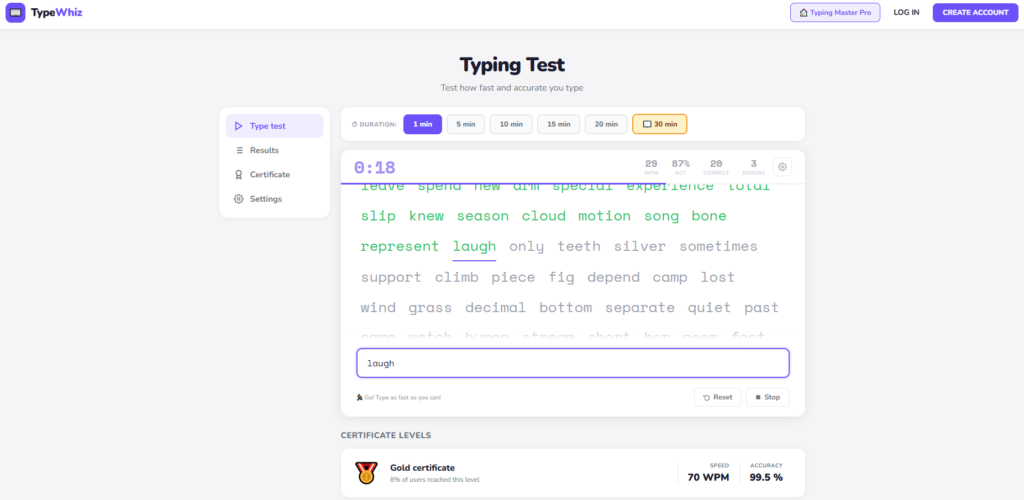
TypeWhiz (TypeWhiz Online Free Typing Test) designed for users who want clean, fast, and accurate WPM measurement without unnecessary features getting in the way. Hosted directly on TypingMasterPro, you can use the tool right from this page with no signup, no download, and no cost. Whether you are a beginner building your first typing habits or a professional looking for a quick daily benchmark, TypeWhiz gives you your result in 60 seconds or less with instant, honest feedback.
Note: Click on Link 1 to learn more about iframes, so you can understand how this typing tool currently works. A live page will open where you can try out this typing tool.
Link 1 – (https://typingmasterpro.com/typewhiz-online-free-typing-test/) click here and start typing.
Link 2 – (https://typingmasterpro.com/) Homepage
TypeWhiz is a browser-based typing speed test that measures your WPM (words per minute) and accuracy in real time. It is built for speed and simplicity. The interface loads instantly, the test begins the moment you start typing, and the result appears the moment the timer ends. There is no waiting, no loading screens, and no distractions.
The tool is particularly well suited for users who want a consistent daily benchmark. Because it uses a standardised word list and a fixed test duration, your scores across different sessions are directly comparable. This makes it straightforward to track whether your typing speed is improving week over week.
What TypeWhiz gives you:
Taking your first test takes under two minutes from start to result. Follow these steps:
A practical tip: your first test of any session is rarely your best. Your fingers need a warm-up period of one or two tests before reaching their natural pace. Always run at least two tests per session and use the second or third result as your recorded score.
WPM is your net typing speed. It counts only correctly typed words and divides that number by the test duration in minutes. The standard definition treats every five characters including spaces as one word, so the calculation is consistent regardless of whether you typed short or long words. This is the number used by employers, exam boards, and professional standards to specify typing speed requirements.
Your accuracy score tells you what fraction of your keystrokes were correct. For professional and exam purposes, 95% accuracy or above is the general standard. If your accuracy drops below 90%, your effective WPM in real-world tasks will be significantly lower than your test score suggests, because real errors cost you correction time and mental focus that the test does not fully penalise.
A high WPM with low accuracy is less useful than a moderate WPM with high accuracy. A typist scoring 75 WPM at 98% accuracy is more productive in real work than one scoring 90 WPM at 88% accuracy, because the second typist spends significantly more time correcting errors in actual documents. The goal is to raise both numbers together rather than chasing WPM at the cost of accuracy.
Here is a practical reference for interpreting your TypeWhiz score:
| WPM Range | Skill Level | Typical User Profile | Recommended Focus |
| Under 30 WPM | Beginner | New to touch typing | Home row position, stop looking at keys |
| 30 to 45 WPM | Basic | Casual everyday typist | Daily practice, accuracy before speed |
| 45 to 60 WPM | Intermediate | General office or admin | Punctuation practice, fewer corrections |
| 60 to 80 WPM | Proficient | Professional typist | Consistency, harder word sets |
| 80 to 100 WPM | Advanced | Developer or writer | Sustained accuracy over longer durations |
| 100+ WPM | Expert | Competitive or specialist typist | Maintain speed, reduce error rate |
For Indian government competitive exams, the minimum typing speed requirements are 35 WPM for SSC CGL and SSC CHSL, 30 WPM with 85% accuracy for CPCT, and 40 WPM for most bank clerk posts. Practising on TypeWhiz until you score 50 to 55 WPM consistently gives you a reliable buffer for exam day conditions.
TypeWhiz works well for a wide range of users. Here is who benefits most from this particular tool:
The clean, distraction-free interface and consistent word list make TypeWhiz a good daily benchmark tool for students preparing for SSC, CPCT, RRB, or state government typing tests. Taking a test at the start and end of each study session shows you whether your practice is translating into measurable speed.
For people who type for several hours every day, a quick daily WPM check on TypeWhiz takes less than two minutes and gives you a clear sense of whether fatigue or distraction is affecting your speed at different times of the day. Many typists find their speed is highest in the first two hours of a working day and drops noticeably in the afternoon.
TypeWhiz’s simple layout removes confusion for new typists. There are no complicated settings to navigate before you can take a test. You open the page, you type, you see your result. For beginners who are still building basic habits, this simplicity is an advantage over tools with more features but steeper learning curves.
Writers, journalists, developers, lawyers, and anyone else who types significant amounts of text as part of their work can use TypeWhiz to track their baseline speed and notice if it is declining due to repetitive strain or poor habits. A falling WPM score over several weeks can be an early signal worth paying attention to.
A simple daily routine that fits into 15 minutes and produces consistent improvement over 30 days:
The whole routine takes 12 to 15 minutes. Following it every day for 30 days produces a measurable improvement in both WPM and accuracy for most typists. The consistency of showing up daily matters more than the length of any individual session.
| Feature | TypeWhiz | Monkey Typing | 10 Fast Fingers | Fast Fingers Typing |
| Free to Use | Yes | Yes | Yes | Yes |
| No Login Required | Yes | Yes | Yes | Yes |
| Real-Time WPM | Yes | Yes | Yes | Yes |
| Accuracy Score | Yes | Yes | Yes | Yes |
| Leaderboard | No | No | Yes | No |
| Multiplayer Mode | No | No | Yes | No |
| 200+ Themes | No | Yes | No | No |
| Typing Games | No | No | No | Yes |
| Best For | Quick daily benchmark | Theme and language variety | Competition and ranking | Games and consistency score |
Yes. TypeWhiz on this page is 100% free with no hidden premium features, no subscription, and no account required.
The tool works in mobile browsers. For accurate WPM results, a physical keyboard connected to your device gives better performance than a touchscreen keyboard, which adds latency and limits how fast you can type.
WPM is calculated as the number of correctly typed words divided by the test duration in minutes. One word is defined as five characters including spaces. This is the industry-standard calculation used by most professional typing assessments.
For general professional use, 95% accuracy or above is the standard to aim for. For competitive exams such as CPCT, 85% is the stated minimum but aiming for 95% in practice gives you a stronger margin on exam day.
Daily practice of 15 minutes produces the most consistent improvement. Typing speed is a physical skill that improves through regular repetition rather than through occasional long sessions.
Yes. TypeWhiz is a good daily benchmark tool for competitive exam preparation. For closest exam simulation, pair it with practice on passage-style text using the Custom Typing Test available in 10 Fast Fingers, also on TypingMasterPro.
Yes. A variation of 5 to 10 WPM between tests is completely normal and expected. Factors such as time of day, finger temperature, familiarity with the specific words shown, and focus level all affect individual test results. Average your last five tests for a more reliable measure of your actual speed.
Use the TypeWhiz test in the tool above to take your first test right now. Note your WPM and accuracy, then return each day for a short practice session. The combination of consistent daily testing and deliberate practice on your weak spots is the most reliable path to a higher typing speed.
For more typing tools on TypingMasterPro, explore Monkey Typing Test for theme variety, 10 Fast Fingers for leaderboard competition, KeyRush for a different test format, and the dedicated Hindi Typing Test for Devanagari practice.