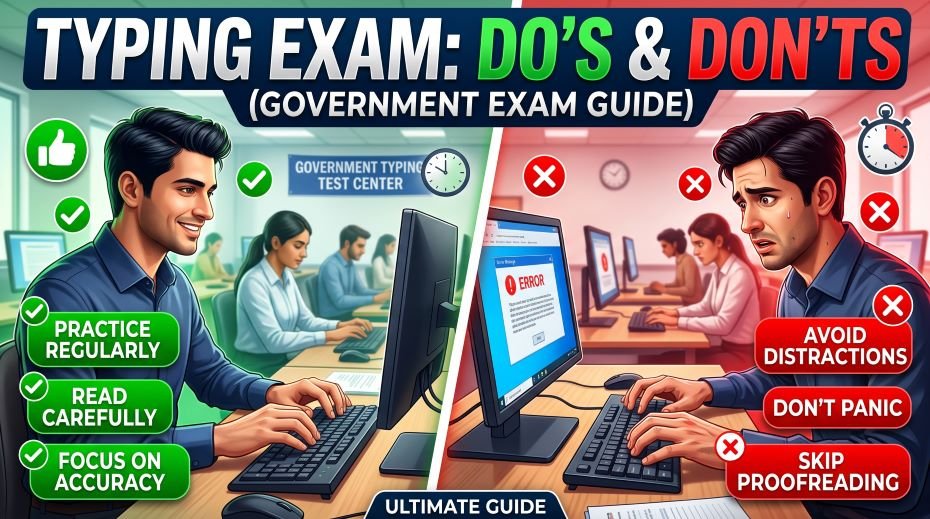
Today we will know more about Do’s and Don’ts During a Government Typing Exam and a Complete list of do’s and don’ts for government typing exams -seating, screen setup, instructions, discipline rules, and exam hall conduct that can save your candidature.
A government typing test is not judged on typing speed alone -exam hall conduct matters just as much. Every year, capable candidates lose their candidature not because they typed slowly, but because they broke a hall rule they did not take seriously: talking to a neighbour, adjusting a chair mid-test, or simply not listening to the full instruction before starting. This guide lays out exactly what to do and what to avoid, from the moment you enter the exam hall to the moment you walk out, so a small mistake never costs you a real opportunity.
Before You Enter the Exam Hall
Discipline for a typing exam actually starts outside the exam hall, on your way there.
- Leave home with enough buffer time to account for traffic and road crossing delays -arriving stressed affects your hands more than most candidates expect.
- Carry your admit card, valid ID, and a bottle of water; drink before entering, since you generally cannot drink during the actual test.
- Use the washroom before reporting to your allotted seat -mid-exam breaks are rarely allowed once typing begins.
- Reach your seat early enough to settle down instead of rushing in at the last minute.
Settling In: What You Can Still Adjust
Once you’re at your seat but before the official test begins, this is your window to fix anything about your setup -after the exam starts, most halls will not allow changes. This stage matters for anyone taking a touch typing based test, where hand position and screen angle directly affect accuracy.
- Check your keyboard and mouse; if a key feels sticky or unresponsive, raise your hand and request a replacement before the test starts, not during it.
- Adjust your monitor or screen angle for comfortable, glare-free reading.
- If typing from a printed passage, position the page where your neck does not need to twist repeatedly -slightly angled next to the screen usually works best.
- If your seat itself is uneven, wobbly, or uncomfortable, request a seat change now, calmly and only through the invigilator.
- Confirm chair height and desk distance so your wrists can stay flat once typing begins.
Do’s and Don’ts Once the Exam Begins
This is the core part every candidate must internalise. Below is a direct comparison of correct exam-hall behaviour versus actions that commonly lead to warnings or disqualification.
| Situation | Do | Don’t |
| Starting the test | Start typing only after the examiner clearly says “start” | Don’t type a single letter before the official start command, even to “test” the keyboard |
| Stopping the test | Stop immediately when “stop” is announced and move hands away from the keyboard | Don’t complete the current word or sentence after the stop command |
| Talking | Stay silent throughout the test duration | Don’t talk to neighbouring candidates before, during, or immediately after the test |
| Looking around | Keep your eyes on your own screen and passage | Don’t glance at another candidate’s screen -even an innocent glance can be reported as malpractice |
| Physical movement | Sit still; minor natural movement is fine | Avoid unnecessary movements like scratching your face or adjusting hair mid-test unless truly necessary |
| Breaks | Use the washroom before the test starts | Don’t request a drinking or washroom break once typing has begun, unless it’s a genuine emergency |
| Keys and shortcuts | Follow only the keys explicitly permitted in the instructions | Don’t use backspace, scroll, or shortcut keys if the invigilator has stated they are restricted |
| Doubts or issues | Raise your hand and wait calmly for the invigilator | Don’t get up, walk over, or call out loudly to report a problem |
| After the test ends | Leave the hall quietly once permitted | Don’t discuss answers, speed, or performance with other candidates inside or right outside the hall |
Why Even Small Actions Can Lead to Disqualification
Typing tests conducted for government recruitment follow strict conduct codes because the process is treated as a formal, monitored examination with legal and administrative weight behind every result. Invigilators are trained to flag behaviour that could indicate an attempt to gain unfair advantage, communicate with others, or disrupt the test environment -even if no rule was intentionally broken. A single complaint from an invigilator, sometimes based on something as small as repeated eye movement toward a neighbour’s screen, can be enough to cancel a candidature. This is precisely why staying focused entirely on your own screen and passage, for the entire duration, protects you far more than it costs you.
Time Management Inside the Exam
Government typing tests are almost always short, strict, and unforgiving of wasted seconds -which makes real-time time management essential rather than optional.
- Do not pause to re-read a completed line unless your test format specifically allows review time.
- Avoid perfectionism on a single word -a small error costs less than the seconds lost second-guessing it.
- If backspace is allowed, use it only for genuine errors, not habitual double-checking.
- Keep a steady, even pace rather than alternating between rushed bursts and slow, hesitant typing.
Listening to Instructions: The Most Skipped Step
Every year, some candidates lose marks simply because they typed a version of the passage without registering an instruction that was announced clearly, such as a font size setting, a specific save format, or a restriction on certain keys. Treat the full instruction reading, before the test starts, as part of the exam itself.
- Do not start filling in personal details or adjusting settings while instructions are still being read.
- If you did not hear a part of the instruction clearly, raise your hand immediately rather than assuming or asking a neighbour.
- Confirm software-specific details such as auto-save, word count display, or the exact passage window before typing begins.
After the Exam: Conduct Still Matters
How you behave right after the test also reflects on the discipline of the exam centre, and in shared or multi-shift centres, can even affect other candidates.
- Leave your seat quietly once the invigilator permits it, without commenting on your own performance out loud.
- Avoid discussing your score, mistakes, or difficulty of the passage with others near the hall -someone nearby may have had a tougher attempt and hearing this can affect their morale before their own shift.
- Do not blame the keyboard, chair, or environment loudly in front of staff or other candidates; if there was a genuine technical issue, report it calmly through the proper written complaint process instead.
- Keep your phone switched off or in silent mode until you are fully outside the designated exam premises.
Quick Fact Table: Common Reasons for Typing Test Disqualification
| Reason | Why It Happens | How to Avoid It |
| Starting before command | Candidate types before the official “start” instruction | Keep hands resting near, not on, the keys until “start” is announced |
| Talking during test | Whispering or asking a neighbour something mid-test | Save every question for the invigilator, raise your hand instead |
| Looking at others’ screens | Even a brief, unintentional glance gets flagged | Keep eyes fixed on your own screen and source passage only |
| Continuing after stop command | Finishing a word or line after “stop” is called | Freeze your hands the instant “stop” is said, mid-word if needed |
| Unauthorised key use | Using scroll, backspace, or shortcuts when restricted | Confirm permitted keys during the instruction phase, follow strictly |
Staying Calm on Exam Day
A calm mind types more accurately than a rushed one. A few mindset habits make a real difference on the day itself:
- Plan your travel with extra buffer time so traffic or delays do not add last-minute stress.
- Treat every rule, even ones that feel minor, as non-negotiable rather than optional.
- Focus only on your own passage and pace; comparing yourself to how fast a neighbour seems to be typing helps nobody.
- Accept that a stray sound, a dropped pen nearby, or a brief distraction is normal -do not let it break your focus for the rest of the test.
- Remember that the exam is short; staying composed for those few minutes matters more than anything you do afterward.
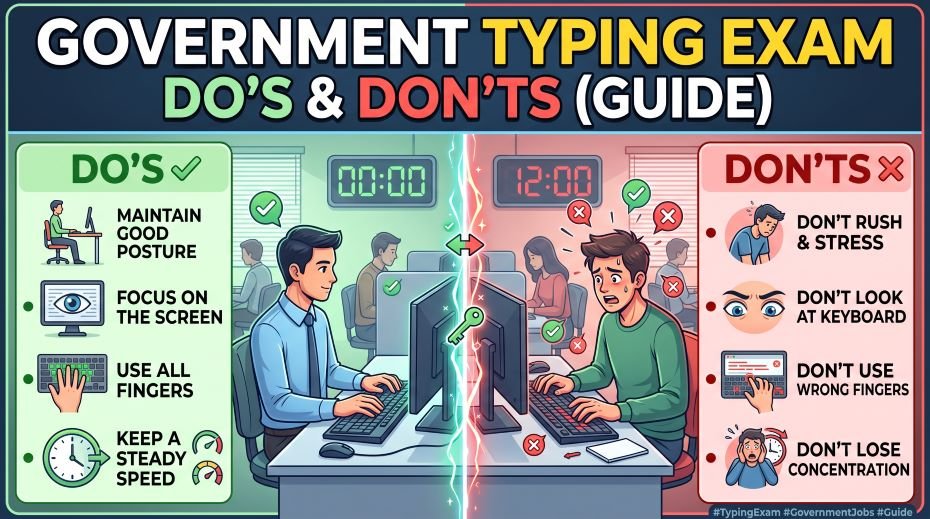
Table: Do’s, Don’ts, Issues & Where to Complain
Government typing exams like SSC and RRB come with strict rules, and even a small mistake – like adjusting your chair without permission or panicking over a technical glitch – can cost you valuable time or marks. Knowing exactly what to do and what to avoid can make the difference between a smooth attempt and a stressful one. Below is a quick guide to common do’s, don’ts, issues you might face, and where to report them, along with real examples from fellow candidates.
| Do’s / Don’ts | Issue / Cause | Problem Faced | Solution / Tip | Where to Complain |
|---|---|---|---|---|
| DO arrive at least 30-45 minutes early | Late arrival | Risk of being denied entry or rushed setup | Plan travel time with buffer for traffic/security checks | Not applicable |
| DO carry admit card + valid ID proof | Missing documents | Denied entry at center | Keep printed + digital copies ready a day before | Not applicable |
| DON’T touch the keyboard/mouse before instructions | Early tampering | May be flagged as malpractice | Wait for invigilator’s go-ahead | Not applicable |
| DO check keyboard/screen during mock/demo time | Faulty hardware | Sticky keys, lag, or unresponsive screen during actual test | Test everything in the demo slot given before exam | Center Invigilator / Superintendent (on the spot) |
| DON’T panic if system freezes mid-exam | Technical glitch | Loss of typed content or exam time | Raise hand calmly, inform invigilator immediately | Center Invigilator / Superintendent |
| DO sit with correct posture | Wrong posture | Hand fatigue, shaky typing, back pain | Keep back straight, wrists neutral, feet flat | Not applicable |
| DON’T argue loudly with staff over issues | Miscommunication | Can lead to disciplinary action | Report issues calmly and in writing if needed | Exam Conducting Body’s Grievance Portal |
| DO read on-screen instructions carefully | Skipping instructions | Wrong test attempt, disqualification risk | Read passage/format rules before starting timer | Not applicable |
| DON’T use unfair means (notes, phone, etc.) | Malpractice | Immediate disqualification, possible ban | Strictly avoid any prohibited items in exam hall | Not applicable |
| DO note your candidate ID/roll number correctly | Data entry error | Result mismatch or rejection later | Double-check details before submitting | Exam Conducting Body’s Grievance Portal (post-exam) |
| DON’T leave keyboard errors uncorrected out of panic | Overlooked typos | Lower accuracy score | Proofread using remaining time before final submission | Not applicable |
| DO ask for a written complaint receipt for any center issue | No proof of complaint | Difficult to raise grievance later | Always request acknowledgment slip from invigilator | Center Superintendent |
Table: Real-Life Examples
| Candidate Situation | What Happened | Outcome / Lesson |
|---|---|---|
| Candidate reached center 10 minutes before exam | Rushed through security check, entered exam hall stressed | Started arriving an hour early for future exams |
| Aspirant’s screen froze 5 minutes into typing test | Panicked and lost 2 minutes before informing staff | Learned to report issues immediately instead of waiting |
| Candidate found sticky keys during mock/demo time | Reported it right away and got a system change before actual test started | Demo time became a mandatory check for every future exam |
| Aspirant forgot printed admit card copy | Denied entry initially, resolved after providing ID and digital copy | Now keeps both physical and digital copies always |
| Candidate argued with invigilator over seating | Got a verbal warning, lost focus for the rest of the test | Learned to raise concerns calmly and in writing |
| Aspirant typed fast but skipped proofreading | Multiple typos reduced accuracy score despite good speed | Now reserves last 1-2 minutes for reviewing typed text |
| Candidate noted wrong roll number in a rush | Faced result discrepancy, had to raise a formal grievance | Double-checks all entry details before submitting |
ALSO READ: My Hands Tremble While Typing During Exams (Causes & Tips)
FAQ:
Can I ask for a washroom break during the typing test?
Generally, no. Washroom and drinking breaks are expected to be taken before the test starts. Breaks mid-test are typically allowed only for genuine emergencies and are handled strictly by the invigilator.
What happens if I accidentally look at another candidate’s screen?
Even an accidental glance can be noted by an invigilator and, depending on the centre’s policy, may lead to a warning or in stricter cases a report against your candidature. It is safest to keep your eyes fixed only on your own screen throughout.
Can I change my seat if it feels uncomfortable?
Yes, but only before the test begins, and only by requesting it calmly through the invigilator. Once the test starts, seat changes are rarely permitted.
A government typing exam rewards more than fast fingers -it rewards discipline, attentiveness, and calm, rule-following behaviour from the moment you walk in to the moment you leave. Most of the do’s and don’ts above cost you nothing extra to follow, yet ignoring even one of them has ended attempts for otherwise well-prepared candidates. Walk in informed, stay focused on your own screen, follow every instruction exactly as given, and let your practice do the rest of the talking.