Today in this article we will discuss about the Typing Master Pro Typing Online (Live) with PPT, PDF, Infographic and Typing Tool link so, let me be honest with you – when I first started learning to type properly, I was the classic two-finger typist. I would stare at the keyboard, hunt for each letter, and still manage to hit the wrong key half the time. Sound familiar? If so, you are in the right place.
In 2026, whether you are a college student typing assignments, an SSC CGL aspirant preparing for your typing skill test, a data entry professional trying to boost your WPM, or just someone who spends hours on a computer every day – your typing speed directly affects how productive and confident you feel. And the difference between 25 WPM and 60 WPM is not just a number. It is hours of time saved every single week.
That is exactly why Typing Master Pro – available at typingmasterpro.com – was built. And the best part? It is 100% free. Not a limited free trial. Not a freemium model. Completely, genuinely, lifetime free. No account needed. No app to download. Just open your browser and start typing.
In this comprehensive, fully updated 2026 guide, we cover everything you need to know about Typing Master Pro – the online platform, its tools, Hindi and regional language support, SSC CGL preparation, how it compares to alternatives, and much more. We have also answered all the most searched questions including typing master pro online free, typing master pro download, typing master pro apk, typing master pro for android, typing master pro online typing test, typing master pro price, and others.
What Is Typing Master Pro? (The Real Answer)
Typing Master Pro, found at typingmasterpro.com, is a completely free online typing test and touch typing practice platform. It was built by a passionate team of educators, developers, and exam preparation experts based in India – people who personally understood the frustrations of finding a reliable, multilingual, exam-focused typing tool.
The platform’s core promise is summed up in its tagline: “Lifetime Free: Online Typing.” That means zero subscriptions, zero paywalls, and zero hidden charges – ever.
It is important to note that typingmasterpro.com is the online version of the Typing Master Pro experience, specifically designed for users who want browser-based, no-install typing practice. This makes it ideal for students on shared computers, government office employees, coaching centre students, and anyone who cannot or does not want to install software on their device.
According to Wikipedia, touch typing is a method of typewriting in which the typist uses all fingers and does not look at the keyboard – relying on muscle memory instead. This is exactly what Typing Master Pro teaches, step by step.
Website: Typing Master Pro – TypingMasterPro.com (Online Version)
Key Features of TypingMasterPro.com at a Glance
| Feature | Details |
| Total Typing Lessons | 22 Structured Free Lessons (Touch Typing Course) |
| Typing Tests Available | English, Hindi, SSC CGL, Fast Fingers, Monkey Typing, and more |
| Hindi Typing Support | Yes – Devanagari script, Krutidev, Unicode, Chanakya, 4CGandhi |
| SSC CGL Test Series | 30+ test series, each 30 minutes (real exam simulation) |
| Account / Sign-Up Required | No – zero registration needed |
| Cost / Price | 100% Free for Life – no premium plan |
| Platform / Installation | Browser-based – works on all devices, no download or install |
| Mobile Friendly | Yes – accessible on smartphones and tablets |
| Languages Supported | English + Hindi (more Indian and world languages coming soon) |
| Real-Time WPM Tracking | Yes – live words per minute and accuracy display |
| Finger-Hint Keyboard | Yes – visual keyboard guide for correct finger placement |
| Daily Updates | Yes – new content, tests, and tools added regularly |
Typing Master Pro Typing Online (PPT SLIDES)
All Typing Tools Available on Typing Master Pro
Typing Master Pro is home to a growing library of typing tools, each designed for a specific user need. Here is a complete breakdown of every tool currently available on typingmasterpro.com:
1. Typing Master Pro Online Version – 22+ Free Lessons
This is the flagship feature of the platform. The 22-lesson structured touch typing course walks you through every key on the keyboard – from home row basics to numbers, symbols, and punctuation. Each lesson focuses on building muscle memory for a specific set of keys, using a finger-hint keyboard display so you always know which finger to use. You get real-time WPM and accuracy feedback after every exercise.
This is the closest you will get to a professional typing tutor without spending money. It is designed for complete beginners but structured well enough that even intermediate typists will benefit from revisiting the foundational lessons.
- Covers every key including numbers and punctuation
- Visual keyboard with finger hints displayed on screen
- Real-time WPM speed and accuracy tracking
- Works in all major browsers – Chrome, Firefox, Edge, Safari
- No account or sign-up required to start
Start the 22-lesson course here: typingmasterpro.com/typing-master-pro-version-online/
2. English Monkey Typing Test
The Monkey Typing Test is one of the most popular tools on the platform. It presents randomized words – not pre-memorized passages – which forces your brain to actually read and type rather than recall text you have seen before. This approach eliminates bad habits, builds genuine finger independence, and is excellent for breaking speed plateaus. Ideal for students and professionals who regularly type in English.
Try it here: typingmasterpro.com/monkey-typing-test/
3. SSC CGL Typing Test – 30+ Series
This is arguably the most valuable tool on the entire platform for Indian users. The SSC CGL Typing Test is purpose-built for Staff Selection Commission Combined Graduate Level exam aspirants. Typing is a mandatory component of the SSC CGL Skill Test, and poor preparation costs candidates their final selection.
Typing Master Pro’s SSC CGL module offers:
- 30+ complete test series – all free, no registration needed
- Each test is 30 minutes long – matching real exam duration
- Passages that simulate the actual SSC CGL typing format
- Real-time WPM and error tracking during the test
- Systematic progression – complete all 30 series for thorough preparation
Access SSC CGL tests here: typingmasterpro.com/fast-fingers-typing-online-typing-test-free/
4. Fast Fingers Typing Test
The Fast Fingers Typing Test is for users who want to push beyond their comfort zone and maximize their raw typing speed. It is a WPM-focused, time-bound challenge that measures how many words per minute you can type under pressure. This is ideal for competitive typists, professionals aiming to increase output speed, and anyone who wants to know their typing ceiling.
Try Fast Fingers here: typingmasterpro.com/fast-fingers-free-online-typing-test/
5. Online Hindi Typing (Devanagari)
This is one of the most unique and widely appreciated features of Typing Master Pro. The Hindi Typing Tool supports the Devanagari script and is specifically designed for government employees, students in Hindi-medium institutions, and anyone preparing for Hindi typing skill tests in state or central government exams.
Supported keyboard layouts include:
- Krutidev – the most widely used Hindi typing layout in government exams
- Unicode – for modern Hindi typing across the internet
- Chanakya – popular in older government typesetting systems
- 4CGandhi – used in specific state government examinations
Practice Hindi typing here: typingmasterpro.com/online-hindi-typing-free-devanagari/
6. TypeWhiz Online Free Typing Test
TypeWhiz is a speed-focused online typing test that provides instant feedback on accuracy and WPM. It is great for daily warm-up sessions before work or study, and for users who want a quick, no-frills typing test experience.
7. Key Rush Typing Speed Test
Key Rush offers an intense, fast-paced typing challenge that tests both your reaction time and your raw typing accuracy. It is designed for users who are already comfortable with touch typing and want to sharpen their competitive edge.
8. Key Racer Free Online Typing Test
Key Racer gamifies the typing experience with a race-style format where you compete against the clock or virtual opponents. This tool makes practice feel less like work and more like a challenge – which is exactly what keeps you coming back for more.
9. TypeBlitz – Type Faster and Smarter
TypeBlitz is designed for users who want to combine speed and intelligence in their typing practice. It adapts to your error patterns and focuses your practice on the areas where you need the most improvement.
10. TypeRocket Online Typing Speed Test
TypeRocket takes a dynamic approach to typing practice. The interface is designed to keep you engaged and motivated, making it ideal for users who find traditional typing tests monotonous.
11. KeyBlaze Typing Speed Test
KeyBlaze is a structured typing test that provides a clean, distraction-free environment for measuring your WPM and accuracy. It is excellent for users who prefer a simple, focused practice experience.
12. 10 Fast Fingers (10FF) Typing Online
The 10 Fast Fingers typing format is one of the most popular typing test formats in the world. Typing Master Pro offers its own version of this classic test, allowing you to measure your WPM against the standard 10FF word list. This is also a great tool for comparing your speed with global typing averages.
13. Type Kids Pro
Type Kids Pro is specifically designed for younger learners – children and beginners who are just starting their typing journey. The interface is simpler, the lessons are shorter, and the exercises are designed to be fun and encouraging rather than intense or pressurizing.
14. Tiny Fingers Pro
Tiny Fingers Pro is another beginner-friendly tool, optimized for users with smaller hands or those typing on smaller keyboards. It adapts key exercises to make the initial learning curve gentler and more manageable.
15. Type Flow PRO – Typing
Type Flow PRO focuses on rhythm and fluency. Rather than just measuring raw speed, it helps you develop a smooth, consistent typing flow – eliminating bursts and pauses that reduce overall efficiency.
16. Hindi Type Pro (Krutidev, Unicode, Chanakya, 4CGandhi)
An advanced version of the Hindi typing tool, Hindi Type Pro is designed for users who need to switch between multiple Hindi keyboard layouts. It is especially useful for professionals who work in multiple government departments with different layout standards.
Complete Tool Directory of TypingMasterPro.com
| Tool Name | Best For | Language | Speed Focus | Exam Prep |
| 22+ Lesson Touch Typing Course | Beginners building foundation | English | Moderate | General |
| English Monkey Typing Test | Intermediate / Advanced | English | High | No |
| SSC CGL Typing Test (30+ Series) | Government exam aspirants | English | Exam-paced | SSC CGL |
| Fast Fingers Typing Test | Speed-focused practice | English | Very High | Competitive |
| Online Hindi Typing (Devanagari) | Hindi govt exam aspirants | Hindi | Moderate | Hindi Exams |
| Hindi Type Pro (Multi-layout) | Multi-layout Hindi typists | Hindi | Moderate | State Exams |
| TypeWhiz Online | Daily warm-up / quick tests | English | Medium | No |
| Key Rush Speed Test | Advanced speed builders | English | High | No |
| Key Racer | Gamified typing practice | English | Medium-High | No |
| TypeBlitz | Adaptive error correction | English | High | No |
| TypeRocket | Engaging / dynamic practice | English | Medium | No |
| KeyBlaze Speed Test | Clean, distraction-free tests | English | Medium | No |
| 10FF Typing Online | WPM benchmarking | English | High | Competitive |
| Type Kids Pro | Children and young beginners | English | Low | No |
| Tiny Fingers Pro | Small hands / small keyboards | English | Low-Medium | No |
| Type Flow PRO | Rhythm and typing fluency | English | Medium | No |
Who Should Use Typing Master Pro?
One of the most impressive things about typingmasterpro.com is how genuinely universal it is. This is not a platform built for one type of user. It was thoughtfully designed to serve everyone – and it delivers on that promise.
Students
Whether you are in school, college, or pursuing a vocational course, faster typing means faster assignment completion, better note-taking, and stronger overall computer literacy. Typing Master Pro’s 22-lesson course takes students from zero typing knowledge to confident touch typing – completely free.
SSC CGL and Government Job Aspirants
This is where Typing Master Pro really shines brighter than any competitor. The dedicated SSC CGL typing test series with 30+ tests, each lasting exactly 30 minutes, gives aspirants a level of exam simulation that most paid platforms do not offer. If you are preparing for SSC CGL, UPSSSC, NIC, or any other central or state government exam that includes a typing skill test, this tool is built specifically for you.
Working Professionals
Data entry operators, content writers, legal assistants, journalists, call centre agents, software developers – anyone whose job involves significant keyboard time will directly benefit from even a 10-15 WPM improvement in typing speed. That translates to real productivity and professional confidence.
Coaching Faculty and Teachers
Typing Master Pro can be used as a completely free classroom resource. Teachers can direct students to specific tools and tests without any setup, registration, or cost. The platform is clean and distraction-free, making it suitable for a classroom environment.
Beginners Starting from Scratch
The platform is built to be beginner-friendly from the ground up. There is no intimidating dashboard, no technical setup, and no pressure. You visit the site, pick a lesson or test, and start. That is it. The team at Typing Master Pro themselves say – “just try it once, and you will feel amazing.”
Hindi Typing on Typing Master Pro: A Special Focus
Most international typing platforms are English-only. This is a major gap for the hundreds of millions of people in India and other South Asian countries who need to type in Hindi or regional languages for work, exams, or daily communication.
Typing Master Pro addresses this gap directly. The platform offers dedicated Hindi typing support in the Devanagari script across multiple keyboard layouts. This is not a token addition – it is a core feature of the platform, built with a deep understanding of what Indian government exam candidates actually need.
| Hindi Layout | Used In | Characteristics |
| Krutidev | SSC, Railway, State PSC exams – most widespread | Non-Unicode, phonetic mapping, legacy standard |
| Unicode (Mangal) | Modern government documents, internet use | Unicode-compliant, works across all modern systems |
| Chanakya | Older government printing and typesetting | Legacy layout, pre-Unicode era standard |
| 4CGandhi | Specific state-level exams (MP, UP, Raj) | Custom layout used in regional exam boards |
The platform’s Hindi Type Pro tool lets users switch between all of these layouts seamlessly, making it the most versatile free Hindi typing resource currently available online. If you are preparing for any Hindi typing exam, typingmasterpro.com should be your primary practice destination.
Typing Master Pro’s Global Vision: Every Language, For Everyone
What sets Typing Master Pro apart from most typing platforms is its bold, inclusive vision. The team is not content with just serving English and Hindi users – they are building toward a platform that supports every major language in the world.
Here is a snapshot of the language roadmap as shared on the platform:
| Region | Languages in Development / Planned |
| Indian Regional Languages | Tamil, Telugu, Kannada, Marathi, Bengali, Gujarati, Punjabi, Malayalam, Odia, Urdu, and more |
| European Languages | Spanish, French, Russian, German, Portuguese (Brazil), Italian, and more |
| Asian Languages | Chinese (Simplified + Traditional), Japanese, Korean, Sanskrit |
| Other World Languages | Arabic, Swahili, Persian, Turkish, and many more |
| American Languages | Mexican Spanish, Brazilian Portuguese, and regional variants |
This commitment to multilingual access is what gives Typing Master Pro the potential to become a truly global typing education resource – not just an India-focused platform.
How to Take a Typing Master Pro Online Typing Test (Step by Step)
Taking a typing test on typingmasterpro.com is one of the simplest experiences on the internet. Here is exactly how to do it:
- Open your browser (Chrome, Firefox, Edge, or any modern browser)
- Visit typingmasterpro.com
- Browse the homepage and choose the test or tool you want to use
- Click on your chosen test – for example, Fast Fingers, SSC CGL, or Monkey Typing
- The test will load immediately – no login, no sign-up, no waiting
- Read the instructions on screen and click Start or begin typing when prompted
- Type the displayed text as accurately and quickly as you can
- When the test ends, review your results: WPM, accuracy percentage, and error count
- Repeat regularly to track your improvement over time
For the 22-lesson typing course, follow the same steps but select the lesson-based tool. Start from Lesson 1 and progress through all 22 lessons in order for the best results.
For SSC CGL preparation specifically, the platform recommends working through all 30+ test series systematically – one or two series per day – reviewing your errors after each session before moving to the next.
Typing Test Durations and Their Best Use Cases
| Test Duration | Best For | Available On Typing Master Pro |
| 1 Minute | Quick warm-up, daily check-in | Yes |
| 3 Minutes | Balanced speed + stamina test | Yes |
| 5 Minutes | Standard WPM benchmark | Yes |
| 10 Minutes | Advanced endurance and consistency test | Yes |
| 30 Minutes | SSC CGL exam simulation (full duration) | Yes – 30+ series |
Typing Master Pro vs. Competitors: Full Honest Comparison
How does Typing Master Pro stack up against the most popular typing tools on the internet? Here is a no-fluff comparison:
| Feature | TypingMasterPro.com | Keybr.com | 10FastFingers | TypingClub | Nitro Type |
| Price | 100% Free Forever | Free + Paid | Free | Free + Paid | Free + Paid |
| Account Required | No | Optional | Optional | Yes (for progress) | Yes |
| Hindi Typing | Yes (multiple layouts) | No | No | No | No |
| SSC CGL Tests | Yes (30+ series) | No | No | No | No |
| Structured Course | Yes (22 lessons) | Yes (adaptive) | No | Yes | No |
| Typing Games | Yes | No | No | Yes | Yes (racing) |
| Exam Simulation | Yes (SSC, govt) | No | No | No | No |
| Mobile Friendly | Yes | Yes | Yes | Yes | Yes |
| Download / Install | Not required | Not required | Not required | Not required | Not required |
| Daily Content Updates | Yes | No | No | Limited | No |
| Regional Language Plan | Yes (roadmap) | No | No | No | No |
| Finger Hint Display | Yes | Yes | No | Yes | No |
Typing Master Pro Download: Do You Actually Need to Download Anything?
This is one of the most commonly searched questions, and the answer is: No, you do not need to download or install anything to use Typing Master Pro.
The typingmasterpro.com platform is 100% browser-based. Everything runs directly in your web browser – Chrome, Firefox, Edge, Opera, or any modern browser on any device. This is a deliberate design choice by the Typing Master Pro team, ensuring that users on shared computers, office systems, school labs, or Chromebooks can all access the platform without any restrictions.
This is especially important for:
- Students using shared computers in schools or colleges who cannot install software
- Government exam candidates practicing in cybercafes or coaching centre labs
- Office employees using locked-down corporate systems
- Mobile phone users who want to practice on a smartphone or tablet
Because no download is required, typing master pro online free practice is available literally anywhere you have an internet connection and a browser.
What About Typing Master Pro APK for Android?
Typing Master Pro as hosted on typingmasterpro.com does not require an APK because it is a web-based platform that is already mobile-browser compatible. You can access the full website on your Android smartphone or tablet directly through Chrome or Firefox. Simply go to typingmasterpro.com in your mobile browser and start practicing.
The site is designed to be mobile-friendly, meaning the interface adapts to your screen size automatically. For best results on mobile, it is recommended to use a physical Bluetooth keyboard if you have one – as practicing on a touchscreen keyboard is fundamentally different from practicing on a physical keyboard for exam preparation.
Typing Master Pro Login: Is an Account Required?
One of the most refreshing things about Typing Master Pro is what it does not require – an account. You do not need to log in, register, or provide any personal information to use any tool on the platform. This is a core value of the team behind the site.
Here is a quick comparison of how Typing Master Pro handles accounts vs. competitors:
| Platform | Account Required to Practice? | Account Required for Progress Tracking? |
| TypingMasterPro.com | No | No |
| TypingClub | No (limited) | Yes |
| Keybr.com | No | Yes (for full history) |
| Nitro Type | Yes | Yes |
| TypeRacer | No (limited) | Yes |
Because typingmasterpro.com requires no login, there is also no typing master pro login page or password recovery process to worry about. Your practice starts the moment you open the website.
Typing Master Pro Price: How Much Does It Cost?
The answer is simple and worth repeating: Typing Master Pro (typingmasterpro.com) is 100% free. There is no pricing structure, no freemium model, no premium tier, and no subscription fee. Every single tool on the platform – all 16+ typing tools, all 30+ SSC CGL test series, the 22-lesson course, Hindi typing, and everything else – is completely free for every user, forever.
| Plan / Tier | Price | Access Level | Registration Needed |
| Free (Only Plan) | $0 / Rs. 0 – Forever | Full access to all tools | No |
| Premium / Paid Plan | Does not exist | N/A | N/A |
| Subscription | Does not exist | N/A | N/A |
This is the single most important reason that typingmasterpro.com stands out from other typing platforms. While competitors rely on subscription revenue and upselling, the team at Typing Master Pro has committed to keeping their platform permanently free – because they genuinely believe that quality typing education should not have a price tag.
Proven Tips to Improve Your Typing Speed with Typing Master Pro
Using the platform is one thing. Using it effectively is another. Here are practical, experience-backed strategies to get the most out of your time on typingmasterpro.com:
- Practice every day, even if only for 15 minutes. Consistency is everything in typing. Daily short sessions build muscle memory far faster than occasional long ones. Think of it like exercise – daily light workouts beat weekly marathon sessions.
- Start with Lesson 1 of the 22-lesson course, even if you already know how to type. The structured lessons will correct bad habits you may not even know you have, and establish the correct finger placement from the start.
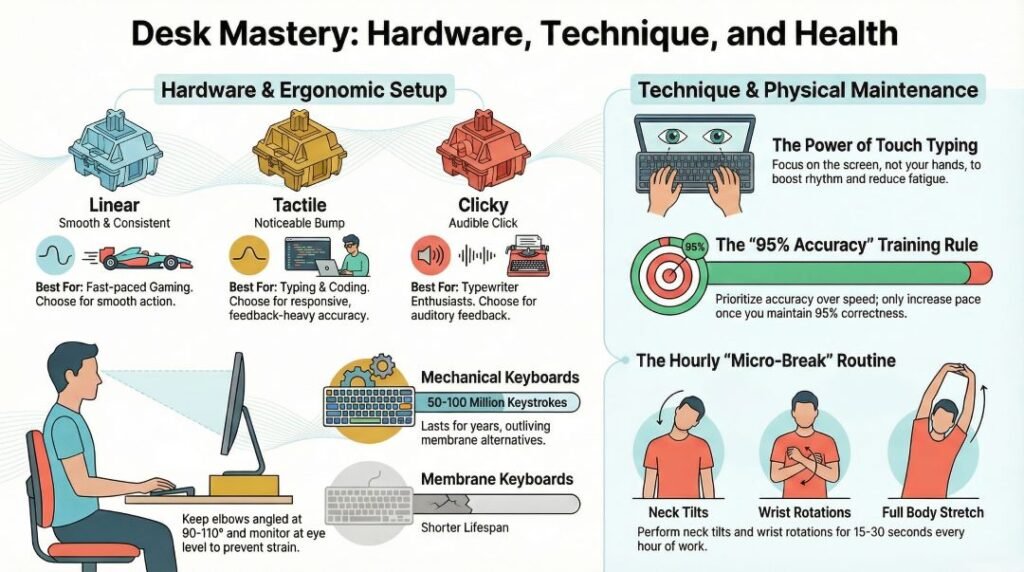
- Prioritize accuracy over speed. It is tempting to rush, but a typist with 65 WPM at 99% accuracy is more valuable than a 85 WPM typist with frequent errors. Speed follows accuracy naturally once muscle memory is established.
- Use all 10 fingers. Avoid the hunt-and-peck two-finger method. Every key has a designated finger. The finger-hint keyboard display on Typing Master Pro makes this easy to learn.
- For SSC CGL preparation, work through the 30+ test series systematically. Do not jump around – follow them in order. After each 30-minute session, review your mistakes and note which keys or words caused the most errors.
- Challenge yourself with the Fast Fingers test once you have built a solid foundation. This pushes your WPM ceiling higher and helps you break through speed plateaus.
- If you type in Hindi for work or exams, use both the Hindi Type Pro and the Online Hindi Typing (Devanagari) tools. Switching between the two helps reinforce muscle memory for different layouts.
- Do not type with your eyes on the keyboard. Glancing down is the most common bad habit. Cover your hands if you have to. Within a week of forcing yourself not to look, you will notice a significant improvement.
- Set a weekly WPM goal. Whether it is 40 WPM, 60 WPM, or 80 WPM – having a specific target keeps you motivated and gives your practice sessions a clear direction.
Typing Speed Benchmarks: What Is a Good WPM Score?
Understanding where you stand relative to industry standards helps you set realistic goals. Here is a comprehensive WPM benchmark table:
| WPM Range | Skill Level | Typical Profile | Accuracy Target |
| Under 20 WPM | Beginner | First-time typist, hunt-and-peck method | Focus on accuracy first |
| 20–35 WPM | Novice | Irregular typist, some finger placement issues | 85–90% accuracy |
| 35–50 WPM | Intermediate | Regular computer user, improving touch typing | 90–95% accuracy |
| 50–65 WPM | Proficient | Office professional, comfortable touch typist | 95%+ accuracy |
| 65–80 WPM | Advanced | Experienced typist, data entry or writing role | 97%+ accuracy |
| 80–100 WPM | Expert | Professional typist, programmer, journalist | 98%+ accuracy |
| 100+ WPM | Elite | Speed typist, stenographer, competitive typist | 99%+ accuracy |
| SSC CGL Minimum | Exam Standard | Required for SSC CGL typing skill test | Approx. 35 WPM in English |
According to Wikipedia, the average typing speed for a professional typist is around 50–80 WPM, while the average computer user types at approximately 40 WPM. The world record for typing speed exceeds 200 WPM.
Wikipedia Reference – Words Per Minute: https://en.wikipedia.org/wiki/Words_per_minute
SSC CGL Typing Test Preparation: A Deep Dive
For the thousands of SSC CGL aspirants reading this – this section is especially for you. The typing skill test is a critical qualifying component of the SSC CGL exam, and it is one area where thorough preparation can make a measurable difference in your final score.
What Is the SSC CGL Typing Skill Test?
The SSC CGL Typing Skill Test is a qualifying test conducted for candidates applying to posts that require typing proficiency. The test is typically conducted on a computer, using an English keyboard in QWERTY layout. The required typing speed varies by post – generally 35 words per minute (WPM) for English typing, corresponding to approximately 10,500 key depressions per hour (KDPH).
How Typing Master Pro Helps SSC CGL Aspirants
- 30+ test series that exactly replicate the 30-minute SSC CGL exam format
- Real-time WPM and error tracking – identical to what you will experience on exam day
- Passage formats designed to match the style of official SSC CGL typing tests
- Completely free – so you can practice as many times as you need without budget constraints
- No registration – so you can access the tests even from a cybercafe or coaching centre
| SSC CGL Typing Requirement | English | Hindi |
| Required Speed (WPM) | Approx. 35 WPM | Approx. 30 WPM |
| Key Depressions Per Hour | Approx. 10,500 KDPH | Approx. 9,000 KDPH |
| Test Duration | 30 minutes | 30 minutes |
| Layout | QWERTY | Mangal / Krutidev (post-specific) |
| Qualifying Nature | Yes (must pass to proceed) | Yes (must pass to proceed) |
Important Pages on TypingMasterPro.com
| Page | URL | Purpose |
| Home | typingmasterpro.com | Main hub – all tools and navigation |
| 22-Lesson Course | typingmasterpro.com/typing-mater-pro-version-online/ | Structured touch typing course |
| Monkey Typing Test | typingmasterpro.com/monkey-typing-test/ | English randomized word typing test |
| SSC CGL Typing Test | typingmasterpro.com/fast-fingers-typing-online-typing-test-free/ | Government exam simulation |
| Fast Fingers Test | typingmasterpro.com/fast-fingers-free-online-typing-test/ | High-speed WPM challenge |
| Hindi Typing (Devanagari) | typingmasterpro.com/online-hindi-typing-free-devanagari/ | Hindi script typing practice |
| Hindi Type Pro | typingmasterpro.com/hindi-type-pro/ | Multi-layout Hindi typing |
| 10FF Typing Online | typingmasterpro.com/10m-fast-fingers-10ff-typing/ | 10 Fast Fingers style WPM test |
| TypeWhiz | typingmasterpro.com/typewhiz-online-free-typing-test/ | Quick online typing test |
| Key Rush | typingmasterpro.com/keyrush-typing-speed-test/ | Reaction-speed typing test |
| Key Racer | typingmasterpro.com/key-racer-free-online-typing-test/ | Gamified race-style typing |
| TypeBlitz | typingmasterpro.com/typeblitz-type-faster-smarter/ | Adaptive error-focused practice |
| TypeRocket | typingmasterpro.com/typerocket-online-typing-speed-test/ | Dynamic typing speed test |
| KeyBlaze | typingmasterpro.com/keyblaze-typing-speed-test/ | Clean, focused WPM test |
| Type Kids Pro | typingmasterpro.com/type-kids-pro/ | Children’s typing tool |
| Tiny Fingers Pro | typingmasterpro.com/tiny-fingers-pro/ | Beginner / small keyboard tool |
| Type Flow PRO | typingmasterpro.com/type-flow-pro-typing/ | Typing rhythm and fluency |
| About Us | typingmasterpro.com/about-us-page-typing-master-pro/ | Team background and mission |
| Contact Us | typingmasterpro.com/contact-us-typing-master-pro/ | Feedback and feature requests |
FAQ:
Is typingmasterpro.com really free?
Yes – completely and permanently free. The platform’s tagline is “Lifetime Free: Online Typing” and this is not a marketing claim. There is no premium plan, no subscription, and no hidden charges. Every tool is free for every user, forever.
Do I need to download anything to use Typing Master Pro?
No. Typing Master Pro is 100% browser-based. You do not need to download an app, install software, or download an APK. Simply open typingmasterpro.com in any browser on any device and start typing immediately.
Is there a Typing Master Pro APK for Android?
The platform does not have a standalone Android APK because it is already fully mobile-browser compatible. You can access all tools on typingmasterpro.com directly from your Android phone’s Chrome or Firefox browser. For serious practice, a Bluetooth keyboard is recommended.
Does Typing Master Pro support Hindi typing?
Yes – extensively. The platform supports Hindi typing in Devanagari script across multiple layouts including Krutidev, Unicode (Mangal), Chanakya, and 4CGandhi. More Indian regional languages are on the development roadmap.
Is there a Typing Master Pro online typing test for 5 minutes or 10 minutes?
Yes. The platform offers tests of various durations. For SSC CGL preparation, the full 30-minute test series is available with 30+ complete series. Standard speed tests are available in shorter formats as well.
Do I need to create an account or log in to use Typing Master Pro?
No. There is no login page, no registration, and no account requirement. You can access every single tool on the platform without providing any personal information. This is a deliberate and permanent policy of the Typing Master Pro team.
How many SSC CGL typing test series are available?
There are 30+ complete SSC CGL typing test series available, each lasting exactly 30 minutes to simulate real exam conditions. New series are added regularly.
What is the typing master pro price?
The price is zero. Rs. 0. $0. There is no paid plan on typingmasterpro.com. The entire platform is free.
Is Typing Master Pro available for Windows 11 or as a desktop app?
Typing Master Pro (typingmasterpro.com) is a web platform and does not require Windows 11 or any specific operating system. It works in any browser on Windows, Mac, Linux, Android, or iOS.
What is the best tool on Typing Master Pro for beginners?
The 22-lesson structured touch typing course is the best starting point for beginners. Start from Lesson 1 and work through all 22 lessons in order. Once you have completed the course, use the Fast Fingers or Monkey Typing tools to build speed.
What WPM can I realistically achieve with regular practice on Typing Master Pro?
Most beginners start at 20–30 WPM. With consistent daily practice of 15–20 minutes, most users reach 50–60 WPM within 6–8 weeks. Advanced and dedicated users can reach 80–100+ WPM over several months. Progress depends on consistency and the quality of practice.
Is Typing Master Pro suitable for children?
Yes. The platform includes Type Kids Pro and Tiny Fingers Pro – tools specifically designed for younger learners with simplified interfaces and shorter, more manageable exercises. These are great for children in schools or at home.
How often is Typing Master Pro updated?
The team behind typingmasterpro.com is committed to daily updates. New typing tests, tools, and blog content are added on a regular basis. The platform is actively maintained and user feedback directly influences new feature development.
The Core Values Behind Typing Master Pro
Understanding what drives the Typing Master Pro team helps explain why the platform is so consistently good – and so consistently free. As shared on their About Us page:
- Free for Life: Every tool is free to use, with no subscriptions, no registration, and no hidden charges. This has always been their policy and it will never change.
- Accuracy First, Speed Second: The platform encourages users to build accuracy before chasing speed. A typist at 65 WPM with 99% accuracy outperforms one at 85 WPM with constant errors – in exams and in real work.
- Built for Indian Users: While the tools are useful globally, there is a special focus on Hindi typing and government exam preparation. The team deeply understands the unique needs of SSC, NIC, UPSSSC, and state PSC exam aspirants.
- Actively Maintained: This is not a set-and-forget website. Content is updated, bugs are fixed, tools are improved, and user feedback is acted upon continuously.
- Honest and Transparent: The team is clear that typingmasterpro.com is not an official government exam platform. It is a preparation resource – and they are upfront about that.
Conclusion: Why Typing Master Pro Should Be Your #1 Typing Platform in (2026-2027)
After exploring every corner of typingmasterpro.com, the conclusion is clear: this platform delivers exceptional value for zero cost. Whether you are a student, a government exam aspirant, a professional, or a complete beginner – Typing Master Pro has the right tools for you, all available instantly, without any account, download, or payment.
The platform’s combination of a structured 22-lesson touch typing course, dedicated SSC CGL test series, comprehensive Hindi typing support, and a growing library of 16+ typing tools makes it one of the most complete free typing resources on the internet in 2026.
The team behind it is passionate, mission-driven, and actively building toward a truly global, multilingual typing platform. That is not something you see often in a free product.
So – whether you searched for typing master pro online free, typing master pro download, typing master pro apk, typing master pro for android, typing master pro online typing test, typing master pro 5 minutes, typing master pro 10 minutes, typing master pro login, typing master pro price, or typing master pro for pc – the answer to all of them leads to the same place: typingmasterpro.com.
Start today. Lesson 1 is waiting. Your faster, more confident typing self is just a few weeks of consistent practice away.
Visit: https://typingmasterpro.com
Lifetime Free: Online Typing